JavaScript Enum variable enables you to create the collection of integer based constant values. In this sample we will learn the different type of JavaScript Enum variable syntaxes and retrieving their integer values using special way to get Enum items. Try the sample code below:
<html>
<head>
<title>Creating Javascript Enum Items</title>
</head>
<body onload="Enum()">
<script type="text/javascript">
var Days = {"sunday" : 0, "monday" : 1, "tuesday" : 3, "wednesday" : 4, "thursday" : 5, "friday" : 6, "saturday" : 7};
document.write("<b>Day Names Enumerator=</b> " + Days.friday + "<br />");
/************************************************************/
function Enum() {}
Enum.ColorType = {red:0, blue:1, green:2}
document.write("<b>Enum Function=</b> " + Enum.ColorType.blue + "<br />");
/************************************************************/
var enumObj = new Object();
enumObj.fontSize = {small:10, medium:12, large:14}
document.write("<b>Enum Object=</b> " + enumObj.fontSize.small + "<br />");
</script>
</body>
</html>
--
ఇట్లు మీ,
చంద్రశేఖర్.
Friday, December 11, 2009


JavaScript Array Object
JavaScript array object allows you to store the multiple values of similar datatype into a single variable. JavaScript Array stores the items at different consecutive index numbers that can be retrieved using JavaScript For loop very easily. In this sample we will learn and practive the different types of JavaScript Array declarations for example dynamic array and length bound array. Now lets the execute the code given in the sample below:
<html>
<head>
<title>Javascript Array</title>
</head>
<body>
<script language="javascript" type="text/javascript">
// Array having dynamic length
var myArr1 = new Array();
myArr1[0] = "John";
myArr1[1] = "Tim";
myArr1[2] = "Smith";
myArr1[3] = "Jack";
document.write("<b>myArr1, Value at index 3 =</b> " + myArr1[3]);
document.write("<br /><br />");
// Array having fixed size i.e. 3
var myArr2 = new Array(3);
myArr2[0] = "John";
myArr2[1] = "Tim";
myArr2[2] = "Smith";
document.write("<b>myArr2, Value at index 0 =</b> " + myArr2[0]);
document.write("<br /><br />");
// inline Array items
var myArr3 = new Array( "John", "Smith", "Tim");
document.write("<b>myArr3, Value at index 2 =</b> " + myArr3[2]);
document.write("<br /><br />");
// Value overwriting at Array index by re-assigning values
myArr3[2] = "Jackson";
document.write("<b>myArr3, New value at index 2 =</b> " + myArr3[2]);
document.write("<br />");
</script>
</body>
</html>
--
ఇట్లు మీ,
చంద్రశేఖర్.
<html>
<head>
<title>Javascript Array</title>
</head>
<body>
<script language="javascript" type="text/javascript">
// Array having dynamic length
var myArr1 = new Array();
myArr1[0] = "John";
myArr1[1] = "Tim";
myArr1[2] = "Smith";
myArr1[3] = "Jack";
document.write("<b>myArr1, Value at index 3 =</b> " + myArr1[3]);
document.write("<br /><br />");
// Array having fixed size i.e. 3
var myArr2 = new Array(3);
myArr2[0] = "John";
myArr2[1] = "Tim";
myArr2[2] = "Smith";
document.write("<b>myArr2, Value at index 0 =</b> " + myArr2[0]);
document.write("<br /><br />");
// inline Array items
var myArr3 = new Array( "John", "Smith", "Tim");
document.write("<b>myArr3, Value at index 2 =</b> " + myArr3[2]);
document.write("<br /><br />");
// Value overwriting at Array index by re-assigning values
myArr3[2] = "Jackson";
document.write("<b>myArr3, New value at index 2 =</b> " + myArr3[2]);
document.write("<br />");
</script>
</body>
</html>
--
ఇట్లు మీ,
చంద్రశేఖర్.
Javascript Array
In JavaScript you can also use Arrays likewise in other programming languages, to store the set of values of same datatype in a single variable. To define an Array in JavaScript new Keyword is used.
In JavaScript you can define arrays in two ways. First by leaving the array size blank that allows it to define its size automatically. If you leave the array size undefined, then you add as many values at different index of array. In second way you can define the size of array by passing the integer value for proper memory allocation.
Syntax1:
var myArr = new Array();
Syntax2:
var myArr = new Array(5);
Also note that if you have defined the array size then you can add values for the array indexes 0 to 4.
Example for array having no size define:
var myArr = new Array();
myArr[0] = "John";
myArr[1] = "Tim";
myArr[2] = "Smith";
myArr[3] = "Jack";
myArr[0] = "John";
myArr[1] = "Tim";
myArr[2] = "Smith";
myArr[3] = "Jack";
Example for array having size limit defined:
var myArr = new Array(3);
myArr[0] = "John";
myArr[1] = "Tim";
myArr[2] = "Smith";
myArr[0] = "John";
myArr[1] = "Tim";
myArr[2] = "Smith";
One another way of defining an Array in JavaScript:
var myArr = new Array( "John", "Smith", "Tim");
Now you have learnt how to define the arrays in JavaScript, then why to waste time for searching here and there to learn how to display the values stored at the different indexes of array.
You can directly call the array values by passing the specific index of the array: alert(myArr[0]);
Above code will display the value stored at the first i.e. 0th index of array.
If you have passed the two different values for the same index of an Array then calling that particular index will return the last value stored in it.
E.g.:
var myArr = new Array();
myArr[0] = "John";
myArr[1] = "Smith";
myArr[0] = "Tim";
alert(myArr[0]);
myArr[0] = "John";
myArr[1] = "Smith";
myArr[0] = "Tim";
alert(myArr[0]);
Above code will display the value "Tim" for 0th index.
You can also use the JavaScript for loop to read the each value in sequence from 0th to the last index of array.
Output:
You can see the output of above discussed codes from the following link:
JavaScript Array Object
Learn from JavaScript split function to convert the string into array and read the array values by using for loop in javascript.
--
ఇట్లు మీ,
చంద్రశేఖర్.
SubString String Function 01
JavaScript Substring function returns the part of the provided string starting from the specified index. By default JavaScript substring function returns the substring starting from the specified index to the end of provided string. Lets try the following sample code to understand the functionality:
<html>
<head>
<title>Javascript Substring String Function 01</title>
</head>
<body>
<script type="text/javascript">
var myString = new String();
myString = "JavaScript SubString";
document.write(myString.substring(11));
</script>
</body>
</html>
JavaScript Substr function returns the part of the provided string starting from the specified starting index. By default JavaScript substr function returns the sub string starting from the specified starting index to the end of provided string. Lets try the following sample code to understand the functionality:
<html>
<head>
<title>Javascript Substr String Function 01</title>
</head>
<body>
<script type="text/javascript">
var myString = new String();
myString = "JavaScript Substr Sample";
document.write(myString.substr(11));
</script>
</body>
</html>
--
ఇట్లు మీ,
చంద్రశేఖర్.
<html>
<head>
<title>Javascript Substring String Function 01</title>
</head>
<body>
<script type="text/javascript">
var myString = new String();
myString = "JavaScript SubString";
document.write(myString.substring(11));
</script>
</body>
</html>
JavaScript Substr function returns the part of the provided string starting from the specified starting index. By default JavaScript substr function returns the sub string starting from the specified starting index to the end of provided string. Lets try the following sample code to understand the functionality:
<html>
<head>
<title>Javascript Substr String Function 01</title>
</head>
<body>
<script type="text/javascript">
var myString = new String();
myString = "JavaScript Substr Sample";
document.write(myString.substr(11));
</script>
</body>
</html>
--
ఇట్లు మీ,
చంద్రశేఖర్.
Replace String Function 01
JavaScript Replace String function allows you to replace the specified string pattern with new string pattern in the provided string. By Default JavaScript Replace function replaces only first occurrence of specified string pattern from the provided string text. Try the sample below to understand the functionality:
<html>
<head>
<title>Javascript Replace String Function 01</title>
</head>
<body>
<script type="text/javascript">
var myString = new String();
myString = "This is first example";
// by default it will find and replace the
// first occurrence of specified string pattern
document.write(myString.replace(/ /,"-"));
</script>
</body>
</html>
--
ఇట్లు మీ,
చంద్రశేఖర్.
<html>
<head>
<title>Javascript Replace String Function 01</title>
</head>
<body>
<script type="text/javascript">
var myString = new String();
myString = "This is first example";
// by default it will find and replace the
// first occurrence of specified string pattern
document.write(myString.replace(/ /,"-"));
</script>
</body>
</html>
--
ఇట్లు మీ,
చంద్రశేఖర్.
IndexOf String Function 01
JavaScript IndexOf string function returns the starting index of the specified string pattern from the provided string. JavaScript IndexOf function starts traversing the string from left side of the provided string and returns the first occurrence of the specified string pattern. Try the sample below:
<html>
<head>
<title>Javascript indexOf String Function 01</title>
</head>
<body>
<script type="text/javascript">
var myString = new String();
myString = "This is a sample text to test javascript function.";
document.write(myString.indexOf("s"));
document.write("<br />");
document.write(myString.indexOf("te"));
document.write("<br />");
</script>
</body>
</html>
--
ఇట్లు మీ,
చంద్రశేఖర్.
<html>
<head>
<title>Javascript indexOf String Function 01</title>
</head>
<body>
<script type="text/javascript">
var myString = new String();
myString = "This is a sample text to test javascript function.";
document.write(myString.indexOf("s"));
document.write("<br />");
document.write(myString.indexOf("te"));
document.write("<br />");
</script>
</body>
</html>
--
ఇట్లు మీ,
చంద్రశేఖర్.
Is_Numeric () PHP Function
Definition: The is_numeric () function is used to check if a value is a number. This could be used within an if () statement to treat numbers in one way and non-numbers in another. It will return true or false. Numeric strings consist of an optional sign (such as + or -), any number of digits, optional decimal point and optional exponent. It will also identify a hexadecimal number, but only on its own without a sign, decimal or exponent.
Also Known As: Is Numeric, Is Number
Examples:
<?php
if (is_numeric (887))
{
echo "Yes";
} else {
echo "No";
}
?>
Since 887 is a number, this should echo "Yes"
<?php
if (is_numeric ("cake"))
{
echo "Yes";
} else {
echo "No";
}
?>
Since cake is not a number, this should echo "No"
--
Thanks,
B.Chandrashekhar.
Thursday, December 10, 2009
ANSI character set and equivalent Unicode and HTML characters
The ANSI set of 217 characters, also known as Windows-1252, was the standard for the core fonts supplied with US versions of Microsoft Windows up to and including Windows 95 and Windows NT 4. During the lifetime of those two products, Microsoft added the euro currency symbol bringing the number of characters to 218, and introduced a new core set of Pan-European fonts containing the WGL4 (Windows Glyph List 4) character set, with 652 characters.
If you use a version of Windows that is designed for a non-Latin alphabet such as Arabic, Cyrillic, Greek, Hebrew or Thai to view a document that has been typed using the ANSI character set, then characters from these languages may replace some of those in the 128–255 range; this problem will be resolved when Unicode becomes more widely used, because it provides a unique numeric identifier for each character. There are similar problems when transferring ANSI documents to DOS or Macintosh computers, because DOS and MacRoman arrange characters differently in the 128–255 range.
ANSI characters 32 to 127 correspond to those in the 7-bit ASCII character set, which forms the Basic Latin Unicode character range. Characters 160–255 correspond to those in the Latin-1 Supplement Unicode character range. Positions 128–159 in Latin-1 Supplement are reserved for controls, but most of them are used for printable characters in ANSI; the Unicode equivalents are noted in the table below. Entries in the "Entity" column are character entity references that can be used in HTML and should be interpreted correctly by Web browsers that support HTML 4.0.
The characters that appear in the first column of the following table are generated from Unicode numeric character references, and so they should appear correctly in any Web browser that supports Unicode and that has suitable fonts available, regardless of the operating system.
| Character | ANSI Number | Unicode Number | ANSI Hex | Unicode Hex | HTML 4.0 Entity | Unicode Name | Unicode Range |
|---|---|---|---|---|---|---|---|
| ' ' | 32 | 32 | 0x20 | U+0020 | space | Basic Latin | |
| ! | 33 | 33 | 0x21 | U+0021 | exclamation mark | Basic Latin | |
| " | 34 | 34 | 0x22 | U+0022 | " | quotation mark | Basic Latin |
| # | 35 | 35 | 0x23 | U+0023 | number sign | Basic Latin | |
| $ | 36 | 36 | 0x24 | U+0024 | dollar sign | Basic Latin | |
| % | 37 | 37 | 0x25 | U+0025 | percent sign | Basic Latin | |
| & | 38 | 38 | 0x26 | U+0026 | & | ampersand | Basic Latin |
| ' | 39 | 39 | 0x27 | U+0027 | apostrophe | Basic Latin | |
| ( | 40 | 40 | 0x28 | U+0028 | left parenthesis | Basic Latin | |
| ) | 41 | 41 | 0x29 | U+0029 | right parenthesis | Basic Latin | |
| * | 42 | 42 | 0x2A | U+002A | asterisk | Basic Latin | |
| + | 43 | 43 | 0x2B | U+002B | plus sign | Basic Latin | |
| , | 44 | 44 | 0x2C | U+002C | comma | Basic Latin | |
| - | 45 | 45 | 0x2D | U+002D | hyphen-minus | Basic Latin | |
| . | 46 | 46 | 0x2E | U+002E | full stop | Basic Latin | |
| / | 47 | 47 | 0x2F | U+002F | solidus | Basic Latin | |
| 0 | 48 | 48 | 0x30 | U+0030 | digit zero | Basic Latin | |
| 1 | 49 | 49 | 0x31 | U+0031 | digit one | Basic Latin | |
| 2 | 50 | 50 | 0x32 | U+0032 | digit two | Basic Latin | |
| 3 | 51 | 51 | 0x33 | U+0033 | digit three | Basic Latin | |
| 4 | 52 | 52 | 0x34 | U+0034 | digit four | Basic Latin | |
| 5 | 53 | 53 | 0x35 | U+0035 | digit five | Basic Latin | |
| 6 | 54 | 54 | 0x36 | U+0036 | digit six | Basic Latin | |
| 7 | 55 | 55 | 0x37 | U+0037 | digit seven | Basic Latin | |
| 8 | 56 | 56 | 0x38 | U+0038 | digit eight | Basic Latin | |
| 9 | 57 | 57 | 0x39 | U+0039 | digit nine | Basic Latin | |
| : | 58 | 58 | 0x3A | U+003A | colon | Basic Latin | |
| ; | 59 | 59 | 0x3B | U+003B | semicolon | Basic Latin | |
| < | 60 | 60 | 0x3C | U+003C | < | less-than sign | Basic Latin |
| = | 61 | 61 | 0x3D | U+003D | equals sign | Basic Latin | |
| > | 62 | 62 | 0x3E | U+003E | > | greater-than sign | Basic Latin |
| ? | 63 | 63 | 0x3F | U+003F | question mark | Basic Latin | |
| @ | 64 | 64 | 0x40 | U+0040 | commercial at | Basic Latin | |
| A | 65 | 65 | 0x41 | U+0041 | Latin capital letter A | Basic Latin | |
| B | 66 | 66 | 0x42 | U+0042 | Latin capital letter B | Basic Latin | |
| C | 67 | 67 | 0x43 | U+0043 | Latin capital letter C | Basic Latin | |
| D | 68 | 68 | 0x44 | U+0044 | Latin capital letter D | Basic Latin | |
| E | 69 | 69 | 0x45 | U+0045 | Latin capital letter E | Basic Latin | |
| F | 70 | 70 | 0x46 | U+0046 | Latin capital letter F | Basic Latin | |
| G | 71 | 71 | 0x47 | U+0047 | Latin capital letter G | Basic Latin | |
| H | 72 | 72 | 0x48 | U+0048 | Latin capital letter H | Basic Latin | |
| I | 73 | 73 | 0x49 | U+0049 | Latin capital letter I | Basic Latin | |
| J | 74 | 74 | 0x4A | U+004A | Latin capital letter J | Basic Latin | |
| K | 75 | 75 | 0x4B | U+004B | Latin capital letter K | Basic Latin | |
| L | 76 | 76 | 0x4C | U+004C | Latin capital letter L | Basic Latin | |
| M | 77 | 77 | 0x4D | U+004D | Latin capital letter M | Basic Latin | |
| N | 78 | 78 | 0x4E | U+004E | Latin capital letter N | Basic Latin | |
| O | 79 | 79 | 0x4F | U+004F | Latin capital letter O | Basic Latin | |
| P | 80 | 80 | 0x50 | U+0050 | Latin capital letter P | Basic Latin | |
| Q | 81 | 81 | 0x51 | U+0051 | Latin capital letter Q | Basic Latin | |
| R | 82 | 82 | 0x52 | U+0052 | Latin capital letter R | Basic Latin | |
| S | 83 | 83 | 0x53 | U+0053 | Latin capital letter S | Basic Latin | |
| T | 84 | 84 | 0x54 | U+0054 | Latin capital letter T | Basic Latin | |
| U | 85 | 85 | 0x55 | U+0055 | Latin capital letter U | Basic Latin | |
| V | 86 | 86 | 0x56 | U+0056 | Latin capital letter V | Basic Latin | |
| W | 87 | 87 | 0x57 | U+0057 | Latin capital letter W | Basic Latin | |
| X | 88 | 88 | 0x58 | U+0058 | Latin capital letter X | Basic Latin | |
| Y | 89 | 89 | 0x59 | U+0059 | Latin capital letter Y | Basic Latin | |
| Z | 90 | 90 | 0x5A | U+005A | Latin capital letter Z | Basic Latin | |
| [ | 91 | 91 | 0x5B | U+005B | left square bracket | Basic Latin | |
| \ | 92 | 92 | 0x5C | U+005C | reverse solidus | Basic Latin | |
| ] | 93 | 93 | 0x5D | U+005D | right square bracket | Basic Latin | |
| ^ | 94 | 94 | 0x5E | U+005E | circumflex accent | Basic Latin | |
| _ | 95 | 95 | 0x5F | U+005F | low line | Basic Latin | |
| ` | 96 | 96 | 0x60 | U+0060 | grave accent | Basic Latin | |
| a | 97 | 97 | 0x61 | U+0061 | Latin small letter a | Basic Latin | |
| b | 98 | 98 | 0x62 | U+0062 | Latin small letter b | Basic Latin | |
| c | 99 | 99 | 0x63 | U+0063 | Latin small letter c | Basic Latin | |
| d | 100 | 100 | 0x64 | U+0064 | Latin small letter d | Basic Latin | |
| e | 101 | 101 | 0x65 | U+0065 | Latin small letter e | Basic Latin | |
| f | 102 | 102 | 0x66 | U+0066 | Latin small letter f | Basic Latin | |
| g | 103 | 103 | 0x67 | U+0067 | Latin small letter g | Basic Latin | |
| h | 104 | 104 | 0x68 | U+0068 | Latin small letter h | Basic Latin | |
| i | 105 | 105 | 0x69 | U+0069 | Latin small letter i | Basic Latin | |
| j | 106 | 106 | 0x6A | U+006A | Latin small letter j | Basic Latin | |
| k | 107 | 107 | 0x6B | U+006B | Latin small letter k | Basic Latin | |
| l | 108 | 108 | 0x6C | U+006C | Latin small letter l | Basic Latin | |
| m | 109 | 109 | 0x6D | U+006D | Latin small letter m | Basic Latin | |
| n | 110 | 110 | 0x6E | U+006E | Latin small letter n | Basic Latin | |
| o | 111 | 111 | 0x6F | U+006F | Latin small letter o | Basic Latin | |
| p | 112 | 112 | 0x70 | U+0070 | Latin small letter p | Basic Latin | |
| q | 113 | 113 | 0x71 | U+0071 | Latin small letter q | Basic Latin | |
| r | 114 | 114 | 0x72 | U+0072 | Latin small letter r | Basic Latin | |
| s | 115 | 115 | 0x73 | U+0073 | Latin small letter s | Basic Latin | |
| t | 116 | 116 | 0x74 | U+0074 | Latin small letter t | Basic Latin | |
| u | 117 | 117 | 0x75 | U+0075 | Latin small letter u | Basic Latin | |
| v | 118 | 118 | 0x76 | U+0076 | Latin small letter v | Basic Latin | |
| w | 119 | 119 | 0x77 | U+0077 | Latin small letter w | Basic Latin | |
| x | 120 | 120 | 0x78 | U+0078 | Latin small letter x | Basic Latin | |
| y | 121 | 121 | 0x79 | U+0079 | Latin small letter y | Basic Latin | |
| z | 122 | 122 | 0x7A | U+007A | Latin small letter z | Basic Latin | |
| { | 123 | 123 | 0x7B | U+007B | left curly bracket | Basic Latin | |
| | | 124 | 124 | 0x7C | U+007C | vertical line | Basic Latin | |
| } | 125 | 125 | 0x7D | U+007D | right curly bracket | Basic Latin | |
| ~ | 126 | 126 | 0x7E | U+007E | tilde | Basic Latin | |
| 127 | 127 | 0x7F | U+007F | (not used) | |||
| € | 128 | 8364 | 0x80 | U+20AC | € | euro sign | Currency Symbols |
| 129 | 129 | 0x81 | U+0081 | (not used) | |||
| ‚ | 130 | 8218 | 0x82 | U+201A | ‚ | single low-9 quotation mark | General Punctuation |
| ƒ | 131 | 402 | 0x83 | U+0192 | ƒ | Latin small letter f with hook | Latin Extended-B |
| „ | 132 | 8222 | 0x84 | U+201E | „ | double low-9 quotation mark | General Punctuation |
| … | 133 | 8230 | 0x85 | U+2026 | … | horizontal ellipsis | General Punctuation |
| † | 134 | 8224 | 0x86 | U+2020 | † | dagger | General Punctuation |
| ‡ | 135 | 8225 | 0x87 | U+2021 | ‡ | double dagger | General Punctuation |
| ˆ | 136 | 710 | 0x88 | U+02C6 | ˆ | modifier letter circumflex accent | Spacing Modifier Letters |
| ‰ | 137 | 8240 | 0x89 | U+2030 | ‰ | per mille sign | General Punctuation |
| Š | 138 | 352 | 0x8A | U+0160 | Š | Latin capital letter S with caron | Latin Extended-A |
| ‹ | 139 | 8249 | 0x8B | U+2039 | ‹ | single left-pointing angle quotation mark | General Punctuation |
| Π| 140 | 338 | 0x8C | U+0152 | Π| Latin capital ligature OE | Latin Extended-A |
| 141 | 141 | 0x8D | U+008D | (not used) | |||
| Ž | 142 | 381 | 0x8E | U+017D | Latin capital letter Z with caron | Latin Extended-A | |
| 143 | 143 | 0x8F | U+008F | (not used) | |||
| 144 | 144 | 0x90 | U+0090 | (not used) | |||
| ' | 145 | 8216 | 0x91 | U+2018 | ‘ | left single quotation mark | General Punctuation |
| ' | 146 | 8217 | 0x92 | U+2019 | ’ | right single quotation mark | General Punctuation |
| " | 147 | 8220 | 0x93 | U+201C | “ | left double quotation mark | General Punctuation |
| " | 148 | 8221 | 0x94 | U+201D | ” | right double quotation mark | General Punctuation |
| • | 149 | 8226 | 0x95 | U+2022 | • | bullet | General Punctuation |
| – | 150 | 8211 | 0x96 | U+2013 | – | en dash | General Punctuation |
| — | 151 | 8212 | 0x97 | U+2014 | — | em dash | General Punctuation |
| ˜ | 152 | 732 | 0x98 | U+02DC | ˜ | small tilde | Spacing Modifier Letters |
| ™ | 153 | 8482 | 0x99 | U+2122 | ™ | trade mark sign | Letterlike Symbols |
| š | 154 | 353 | 0x9A | U+0161 | š | Latin small letter s with caron | Latin Extended-A |
| › | 155 | 8250 | 0x9B | U+203A | › | single right-pointing angle quotation mark | General Punctuation |
| œ | 156 | 339 | 0x9C | U+0153 | œ | Latin small ligature oe | Latin Extended-A |
| 157 | 157 | 0x9D | U+009D | (not used) | |||
| ž | 158 | 382 | 0x9E | U+017E | Latin small letter z with caron | Latin Extended-A | |
| Ÿ | 159 | 376 | 0x9F | U+0178 | Ÿ | Latin capital letter Y with diaeresis | Latin Extended-A |
| 160 | 160 | 0xA0 | U+00A0 | | no-break space | Latin-1 Supplement | |
| ¡ | 161 | 161 | 0xA1 | U+00A1 | ¡ | inverted exclamation mark | Latin-1 Supplement |
| ¢ | 162 | 162 | 0xA2 | U+00A2 | ¢ | cent sign | Latin-1 Supplement |
| £ | 163 | 163 | 0xA3 | U+00A3 | £ | pound sign | Latin-1 Supplement |
| ¤ | 164 | 164 | 0xA4 | U+00A4 | ¤ | currency sign | Latin-1 Supplement |
| ¥ | 165 | 165 | 0xA5 | U+00A5 | ¥ | yen sign | Latin-1 Supplement |
| ¦ | 166 | 166 | 0xA6 | U+00A6 | ¦ | broken bar | Latin-1 Supplement |
| § | 167 | 167 | 0xA7 | U+00A7 | § | section sign | Latin-1 Supplement |
| ¨ | 168 | 168 | 0xA8 | U+00A8 | ¨ | diaeresis | Latin-1 Supplement |
| © | 169 | 169 | 0xA9 | U+00A9 | © | copyright sign | Latin-1 Supplement |
| ª | 170 | 170 | 0xAA | U+00AA | ª | feminine ordinal indicator | Latin-1 Supplement |
| « | 171 | 171 | 0xAB | U+00AB | « | left-pointing double angle quotation mark | Latin-1 Supplement |
| ¬ | 172 | 172 | 0xAC | U+00AC | ¬ | not sign | Latin-1 Supplement |
| | 173 | 173 | 0xAD | U+00AD | ­ | soft hyphen | Latin-1 Supplement |
| ® | 174 | 174 | 0xAE | U+00AE | ® | registered sign | Latin-1 Supplement |
| ¯ | 175 | 175 | 0xAF | U+00AF | ¯ | macron | Latin-1 Supplement |
| ° | 176 | 176 | 0xB0 | U+00B0 | ° | degree sign | Latin-1 Supplement |
| ± | 177 | 177 | 0xB1 | U+00B1 | ± | plus-minus sign | Latin-1 Supplement |
| ² | 178 | 178 | 0xB2 | U+00B2 | ² | superscript two | Latin-1 Supplement |
| ³ | 179 | 179 | 0xB3 | U+00B3 | ³ | superscript three | Latin-1 Supplement |
| ´ | 180 | 180 | 0xB4 | U+00B4 | ´ | acute accent | Latin-1 Supplement |
| µ | 181 | 181 | 0xB5 | U+00B5 | µ | micro sign | Latin-1 Supplement |
| ¶ | 182 | 182 | 0xB6 | U+00B6 | ¶ | pilcrow sign | Latin-1 Supplement |
| · | 183 | 183 | 0xB7 | U+00B7 | · | middle dot | Latin-1 Supplement |
| ¸ | 184 | 184 | 0xB8 | U+00B8 | ¸ | cedilla | Latin-1 Supplement |
| ¹ | 185 | 185 | 0xB9 | U+00B9 | ¹ | superscript one | Latin-1 Supplement |
| º | 186 | 186 | 0xBA | U+00BA | º | masculine ordinal indicator | Latin-1 Supplement |
| » | 187 | 187 | 0xBB | U+00BB | » | right-pointing double angle quotation mark | Latin-1 Supplement |
| ¼ | 188 | 188 | 0xBC | U+00BC | ¼ | vulgar fraction one quarter | Latin-1 Supplement |
| ½ | 189 | 189 | 0xBD | U+00BD | ½ | vulgar fraction one half | Latin-1 Supplement |
| ¾ | 190 | 190 | 0xBE | U+00BE | ¾ | vulgar fraction three quarters | Latin-1 Supplement |
| ¿ | 191 | 191 | 0xBF | U+00BF | ¿ | inverted question mark | Latin-1 Supplement |
| À | 192 | 192 | 0xC0 | U+00C0 | À | Latin capital letter A with grave | Latin-1 Supplement |
| Á | 193 | 193 | 0xC1 | U+00C1 | Á | Latin capital letter A with acute | Latin-1 Supplement |
| Â | 194 | 194 | 0xC2 | U+00C2 | Â | Latin capital letter A with circumflex | Latin-1 Supplement |
| Ã | 195 | 195 | 0xC3 | U+00C3 | Ã | Latin capital letter A with tilde | Latin-1 Supplement |
| Ä | 196 | 196 | 0xC4 | U+00C4 | Ä | Latin capital letter A with diaeresis | Latin-1 Supplement |
| Å | 197 | 197 | 0xC5 | U+00C5 | Å | Latin capital letter A with ring above | Latin-1 Supplement |
| Æ | 198 | 198 | 0xC6 | U+00C6 | Æ | Latin capital letter AE | Latin-1 Supplement |
| Ç | 199 | 199 | 0xC7 | U+00C7 | Ç | Latin capital letter C with cedilla | Latin-1 Supplement |
| È | 200 | 200 | 0xC8 | U+00C8 | È | Latin capital letter E with grave | Latin-1 Supplement |
| É | 201 | 201 | 0xC9 | U+00C9 | É | Latin capital letter E with acute | Latin-1 Supplement |
| Ê | 202 | 202 | 0xCA | U+00CA | Ê | Latin capital letter E with circumflex | Latin-1 Supplement |
| Ë | 203 | 203 | 0xCB | U+00CB | Ë | Latin capital letter E with diaeresis | Latin-1 Supplement |
| Ì | 204 | 204 | 0xCC | U+00CC | Ì | Latin capital letter I with grave | Latin-1 Supplement |
| Í | 205 | 205 | 0xCD | U+00CD | Í | Latin capital letter I with acute | Latin-1 Supplement |
| Î | 206 | 206 | 0xCE | U+00CE | Î | Latin capital letter I with circumflex | Latin-1 Supplement |
| Ï | 207 | 207 | 0xCF | U+00CF | Ï | Latin capital letter I with diaeresis | Latin-1 Supplement |
| Ð | 208 | 208 | 0xD0 | U+00D0 | Ð | Latin capital letter Eth | Latin-1 Supplement |
| Ñ | 209 | 209 | 0xD1 | U+00D1 | Ñ | Latin capital letter N with tilde | Latin-1 Supplement |
| Ò | 210 | 210 | 0xD2 | U+00D2 | Ò | Latin capital letter O with grave | Latin-1 Supplement |
| Ó | 211 | 211 | 0xD3 | U+00D3 | Ó | Latin capital letter O with acute | Latin-1 Supplement |
| Ô | 212 | 212 | 0xD4 | U+00D4 | Ô | Latin capital letter O with circumflex | Latin-1 Supplement |
| Õ | 213 | 213 | 0xD5 | U+00D5 | Õ | Latin capital letter O with tilde | Latin-1 Supplement |
| Ö | 214 | 214 | 0xD6 | U+00D6 | Ö | Latin capital letter O with diaeresis | Latin-1 Supplement |
| × | 215 | 215 | 0xD7 | U+00D7 | × | multiplication sign | Latin-1 Supplement |
| Ø | 216 | 216 | 0xD8 | U+00D8 | Ø | Latin capital letter O with stroke | Latin-1 Supplement |
| Ù | 217 | 217 | 0xD9 | U+00D9 | Ù | Latin capital letter U with grave | Latin-1 Supplement |
| Ú | 218 | 218 | 0xDA | U+00DA | Ú | Latin capital letter U with acute | Latin-1 Supplement |
| Û | 219 | 219 | 0xDB | U+00DB | Û | Latin capital letter U with circumflex | Latin-1 Supplement |
| Ü | 220 | 220 | 0xDC | U+00DC | Ü | Latin capital letter U with diaeresis | Latin-1 Supplement |
| Ý | 221 | 221 | 0xDD | U+00DD | Ý | Latin capital letter Y with acute | Latin-1 Supplement |
| Þ | 222 | 222 | 0xDE | U+00DE | Þ | Latin capital letter Thorn | Latin-1 Supplement |
| ß | 223 | 223 | 0xDF | U+00DF | ß | Latin small letter sharp s | Latin-1 Supplement |
| à | 224 | 224 | 0xE0 | U+00E0 | à | Latin small letter a with grave | Latin-1 Supplement |
| á | 225 | 225 | 0xE1 | U+00E1 | á | Latin small letter a with acute | Latin-1 Supplement |
| â | 226 | 226 | 0xE2 | U+00E2 | â | Latin small letter a with circumflex | Latin-1 Supplement |
| ã | 227 | 227 | 0xE3 | U+00E3 | ã | Latin small letter a with tilde | Latin-1 Supplement |
| ä | 228 | 228 | 0xE4 | U+00E4 | ä | Latin small letter a with diaeresis | Latin-1 Supplement |
| å | 229 | 229 | 0xE5 | U+00E5 | å | Latin small letter a with ring above | Latin-1 Supplement |
| æ | 230 | 230 | 0xE6 | U+00E6 | æ | Latin small letter ae | Latin-1 Supplement |
| ç | 231 | 231 | 0xE7 | U+00E7 | ç | Latin small letter c with cedilla | Latin-1 Supplement |
| è | 232 | 232 | 0xE8 | U+00E8 | è | Latin small letter e with grave | Latin-1 Supplement |
| é | 233 | 233 | 0xE9 | U+00E9 | é | Latin small letter e with acute | Latin-1 Supplement |
| ê | 234 | 234 | 0xEA | U+00EA | ê | Latin small letter e with circumflex | Latin-1 Supplement |
| ë | 235 | 235 | 0xEB | U+00EB | ë | Latin small letter e with diaeresis | Latin-1 Supplement |
| ì | 236 | 236 | 0xEC | U+00EC | ì | Latin small letter i with grave | Latin-1 Supplement |
| í | 237 | 237 | 0xED | U+00ED | í | Latin small letter i with acute | Latin-1 Supplement |
| î | 238 | 238 | 0xEE | U+00EE | î | Latin small letter i with circumflex | Latin-1 Supplement |
| ï | 239 | 239 | 0xEF | U+00EF | ï | Latin small letter i with diaeresis | Latin-1 Supplement |
| ð | 240 | 240 | 0xF0 | U+00F0 | ð | Latin small letter eth | Latin-1 Supplement |
| ñ | 241 | 241 | 0xF1 | U+00F1 | ñ | Latin small letter n with tilde | Latin-1 Supplement |
| ò | 242 | 242 | 0xF2 | U+00F2 | ò | Latin small letter o with grave | Latin-1 Supplement |
| ó | 243 | 243 | 0xF3 | U+00F3 | ó | Latin small letter o with acute | Latin-1 Supplement |
| ô | 244 | 244 | 0xF4 | U+00F4 | ô | Latin small letter o with circumflex | Latin-1 Supplement |
| õ | 245 | 245 | 0xF5 | U+00F5 | õ | Latin small letter o with tilde | Latin-1 Supplement |
| ö | 246 | 246 | 0xF6 | U+00F6 | ö | Latin small letter o with diaeresis | Latin-1 Supplement |
| ÷ | 247 | 247 | 0xF7 | U+00F7 | ÷ | division sign | Latin-1 Supplement |
| ø | 248 | 248 | 0xF8 | U+00F8 | ø | Latin small letter o with stroke | Latin-1 Supplement |
| ù | 249 | 249 | 0xF9 | U+00F9 | ù | Latin small letter u with grave | Latin-1 Supplement |
| ú | 250 | 250 | 0xFA | U+00FA | ú | Latin small letter u with acute | Latin-1 Supplement |
| û | 251 | 251 | 0xFB | U+00FB | û | Latin small letter with circumflex | Latin-1 Supplement |
| ü | 252 | 252 | 0xFC | U+00FC | ü | Latin small letter u with diaeresis | Latin-1 Supplement |
| ý | 253 | 253 | 0xFD | U+00FD | ý | Latin small letter y with acute | Latin-1 Supplement |
| þ | 254 | 254 | 0xFE | U+00FE | þ | Latin small letter thorn | Latin-1 Supplement |
| ÿ | 255 | 255 | 0xFF | U+00FF | ÿ | Latin small letter y with diaeresis | Latin-1 Supplement |
Problems with non-Latin scripts
If you use the Arabic, Greek, Hebrew, Russian or Thai versions of Microsoft Windows to view a file that uses Latin script and includes accented characters, then the accented characters may be replaced or omitted. For example:
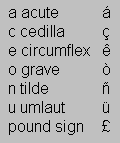 US Windows | 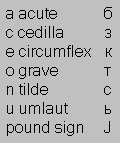 Russian Windows | 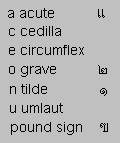 Thai Windows |
This happens because the characters for these non-Latin scripts are coded to the same numbers as the accented Latin characters in the ANSI character set; this problem will be resolved when Unicode becomes more widely used, because it provides a unique numeric identifier for each character.
--
ఇట్లు మీ,
చంద్రశేఖర్.
Limit the Number of Characters in a Textarea or Text Field
Step 1 - Create Function
Insert the following code into the page head:
<script language="javascript" type="text/javascript">
function limitText(limitField, limitCount, limitNum) {
	if (limitField.value.length > limitNum) {
		limitField.value = limitField.value.substring(0, limitNum);
 	} else {
		limitCount.value = limitNum - limitField.value.length;
	}
}
</script>
Step 2 - Create Text Area
Use the following code to create the form and text area (if necessary, change the name of the form and text area to suit your needs):
<form name="myform">
<textarea name="limitedtextarea" onKeyDown="limitText(this.form.limitedtextarea,this.form.countdown,100);"
onKeyUp="limitText(this.form.limitedtextarea,this.form.countdown,100);">
 </textarea><br>
<font size="1">(Maximum characters: 100)<br>
You have <input readonly type="text" name="countdown" size="3" value="100"> characters left.</font>
 </form>
To create a single-line text field instead of a text area, use the following code:
<form name="myform">
<input name="limitedtextfield" type="text" onKeyDown="limitText(this.form.limitedtextfield,this.form.countdown,15);"
onKeyUp="limitText(this.form.limitedtextfield,this.form.countdown,15);" maxlength="15"><br>
 <font size="1">(Maximum characters: 15)<br>
You have <input readonly type="text" name="countdown" size="3" value="15"> characters left.</font>
 </form>
--
ఇట్లు మీ,
చంద్రశేఖర్.
Subscribe to:
Posts (Atom)